I’m on a mission to automate my life, and I over-engineer it along the way. Lately I’ve also been Claude maxxing, which is why there are so many posts.
The first post ended with the fan’s remote decoded and a plan to put the fan on Home Assistant. The fan has a perfectly good remote, so none of this needs to exist. I wanted it anyway.
I used to leave the fan running all day. What I wanted was every button in Home Assistant, a few automations so it runs only when it should, and one cable for data and power.
The Flipper first
The Flipper Zero already has a sub-GHz radio, so before building anything I wanted to know if the decode alone was enough: could it make every button press from the 32-bit word, with no captured files? I asked for the app on the bike ride home, with speed on Up and Down and oscillation on Left and Right. Claude planned the rest, and at my call a cheaper model wrote it. Its frames matched the file that turned the fan on in the first post, value for value, and the fan obeyed.
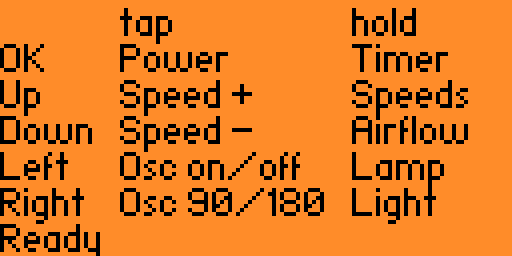
Everything I tried did what the map said except oscillation. The first post named 0x040 and 0x080 as the 90 and 180 degree buttons. 0x040 lights an indicator with up and down arrows and toggles it, and 0x080 goes to 90, then flips between 90 and 180. So it’s one control for turning oscillation on and off and one for the range. Vornado’s Quick-Start Guide lists a vertical oscillation control, which is my guess for the first.
The Flipper also showed the catch: the fan never answers and most of its codes are toggles, so whatever controls it has to keep a guess of its state.
The hardware
It’s a Waveshare ESP32-S3-ETH (the PoE module came with it) and a generic 433 MHz radio module built on TI’s CC1101 chip, running OpenMQTTGateway built from source. Home Assistant got the Mosquitto broker for this. I planned to power it from my eero PoE Gateway, so one cable under the desk would carry data and power.
flowchart LR
    HA["Home Assistant\n+ Mosquitto"] -- MQTT --> G["ESP32-S3\ngateway"]
    G -- SPI --> R["CC1101\n433.92 MHz"]
    R -- decoded presses --> G
    R -- OOK --> F["Vornado EOS 9"]
    REM["the fan's remote"] -- OOK --> R
I wanted the PoE module to stay on the board, and it covers some of the header pins, so the radio got the ones it doesn’t:
| CC1101 pin | Signal | Wire | ESP32-S3-ETH |
|---|---|---|---|
| 1 | GND | brown | GND |
| 2 | VCC | red | 3V3 |
| 3 | GDO0 (data) | orange | IO44 |
| 4 | CSN | yellow | IO0 |
| 5 | SCK | green | IO1 |
| 6 | MOSI | blue | IO2 |
| 7 | MISO | violet | IO43 |
| 8 | GDO2 | none |
The first wiring was press-fit jumpers, a known risk I took to get it online before I left the house. It’s soldered now, and a printed case is next.
Ethernet came up at 100 Mbps on the first boot, with Wi-Fi configured as the fallback. That got a real test when I moved the gateway to a room with no cable and it came back on Wi-Fi by itself. Updates go over the network now. The PoE module isn’t back on yet, so PoE power is untested.
Sending without the data line
There are two ways to get a signal out of a CC1101, and OpenMQTTGateway uses the simple one: bit-banging. The radio sits in a mode where its carrier just follows the data pin, GDO0, which is the orange wire: pin high, carrier on; pin low, carrier off. The ESP32 flips that pin itself, in software, waiting out each pulse width in microseconds (that’s the RCSwitch library). The radio is a dumb modulator, so the signal is only as steady as the ESP32’s timing, and with no wire on GDO0 nothing goes out.
The second way came out of that shaky orange jumper. It was press-fit and wasn’t making contact, and with it open the stock path logged a successful send while the Flipper, listening on the air, never heard a frame the fan would take. Of all the wires on the board, this was either the best one to have loose or the worst. The best, because it’s the only one you can work around: lose power, ground or an SPI wire and the radio is simply gone. The worst, because everything else looked fine. The CC1101 answered over SPI and tuned to 433.92 MHz, and it took a throwaway probe sketch to show the chip forcing GDO0 low while the pin read high. So Claude added the other way, and it stayed.
The ESP32 writes the whole frame into the CC1101’s own 64-byte FIFO over SPI
and tells it to transmit, and the radio shifts the bits out by itself on its
crystal’s clock. The data pin isn’t involved, and a Wi-Fi interrupt can’t
stretch a pulse. At 2.51 kBaud one symbol is one 398 us tick, so a frame is
just bits: the sync is a 1 and thirty 0s, a data 1 is 1110, a 0 is 1000,
and the stop mark is 10. That’s 161 symbols, three frames to a 63-byte FIFO
load, eight frames per press. Home Assistant sends it like any OpenMQTTGateway
code, with its own protocol number:
home/OMG_VORNADO/commands/MQTTto433 {"value": 56545282, "protocol": 99}
Receiving still needs that wire: the radio hands the demodulated signal to the ESP32 on the same pin. That’s the other way the loose jumper showed itself: the gateway transmitted fine and heard nothing when the Flipper sent.
The wire is soldered now, so I could go back to bit-banging. I never ran the old path again once it was in, so I can’t say the FIFO one is better. It could be the same, or worse. Switching back isn’t worth the rewrite, and keeping it is a simplification anyway: the orange wire has one job now, receiving.
The Flipper made a good witness. Its stock subghz rx_raw caught the gateway’s
frames, and measured the same way as the real remote’s they came out close:
short mark 406 us against 397, sync gap 11.94 ms against 11.96. Then at home,
Power turned the fan on, and again off.
The Flipper did most of the testing, in both directions, because it had already proven it could talk to the fan. A script had the gateway send and the Flipper capture it, then had the Flipper transmit and checked what the gateway published. That all ran from the Mac, with the no-action codes (0x400 and 0x800) for anything that could move the fan, so I didn’t have to be at the fan.
Dropping off every few minutes
The first run of all ten commands did nothing. Mosquitto’s log had the pattern: the gateway connected, 90 seconds later the broker dropped it for “exceeded timeout”, and a few minutes later it connected again. Sixteen of seventeen sessions ended that way. Wi-Fi was the obvious suspect, at -73 dBm.
It wasn’t Wi-Fi. For two hours a script held the board’s USB port open to catch a crash, and nothing dropped. Four minutes after it let go, the timeouts came back.
The board logs over the ESP32-S3’s built-in USB serial, and with the Mac
attached and nothing reading the port, each write waits for room.
OpenMQTTGateway logs on every message, so the main loop stopped getting back to
MQTT in time. One line after Serial.begin() fixed it:
Serial.setTxTimeoutMs(0); // unread log output is dropped instead of waited on
The fixed build has stayed up since, apart from test builds and me unplugging it to move it. On a wall charger it couldn’t have happened anyway, with no USB host to wait on.
Home Assistant
Each button is an MQTT-discovery entity under one device, named as in the
Quick-Start Guide. Fan Speeds and Airflow Modes are inferences: I captured
those two as Blade and Menu.
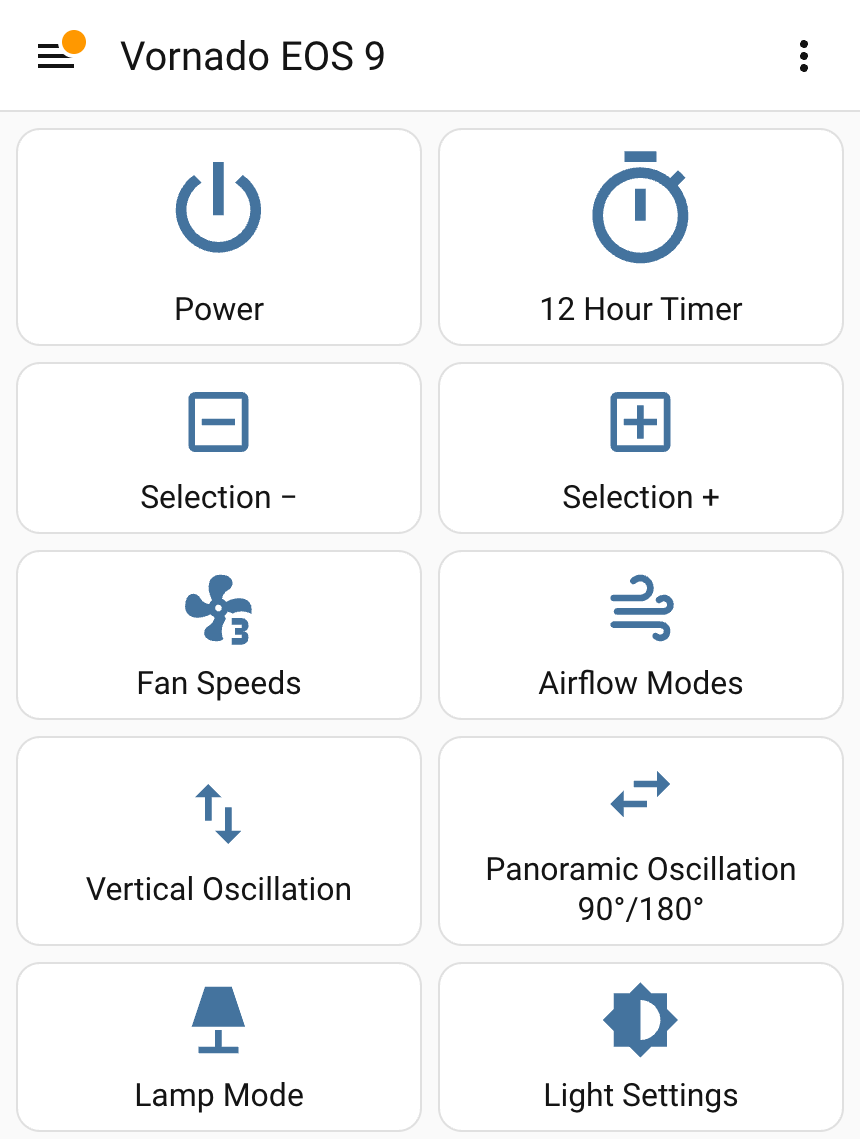
The fan reports nothing, and Power is a toggle, so “turn the fan off” can only mean “press Power if it’s on.” Home Assistant keeps a guess in a “Fan is on (assumed)” helper that flips whenever a Power command goes out, or the gateway hears the real remote’s Power.
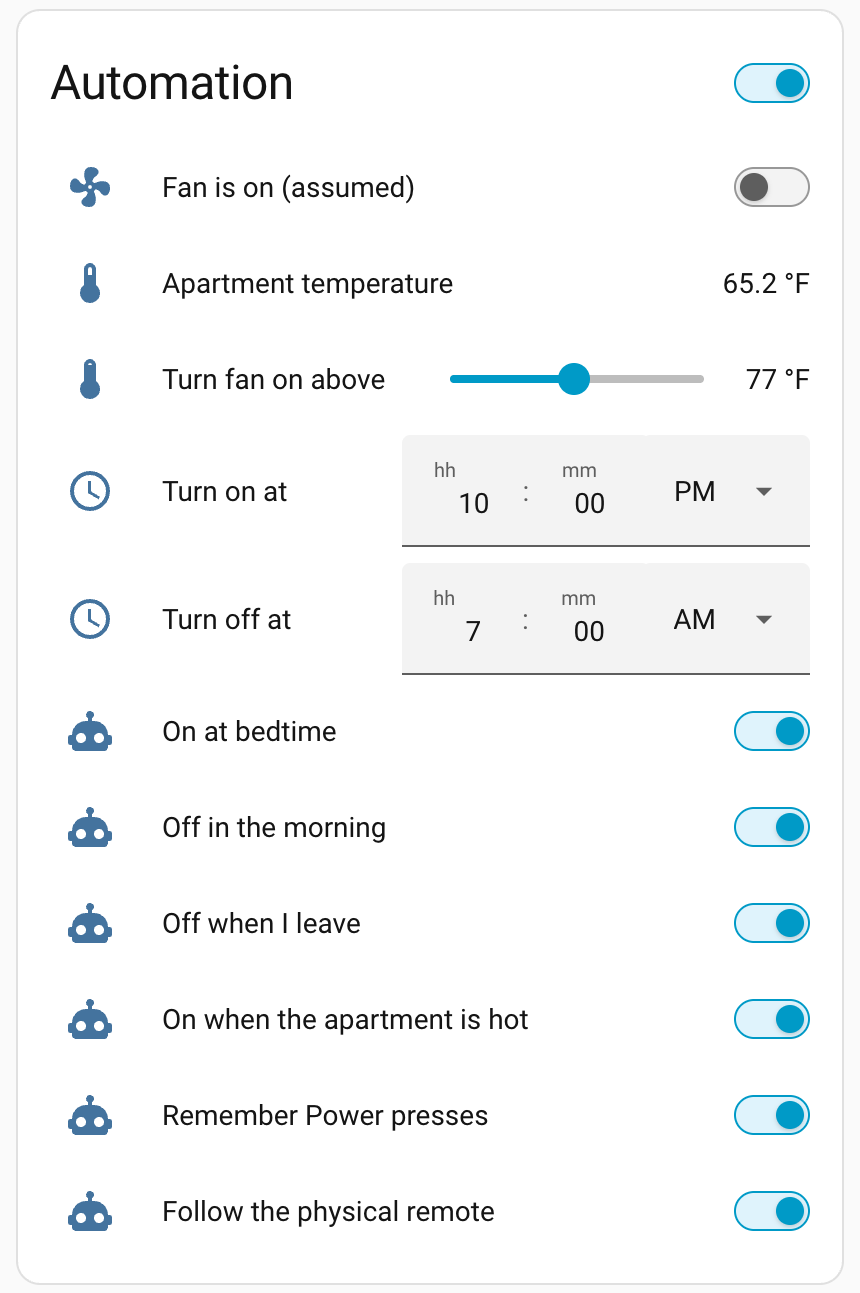
Four automations check the guess before they press anything:
- On at bedtime: 10 PM if I’m home, and again if I get home later that night. I’ve been trying to go to bed earlier, so the fan starting is the cue.
- Off in the morning: 7 AM. The first time it ran, Power went out at 7:00, and I woke up after 7 to a fan that was off.
- Off when I leave: ten minutes after I do, so a GPS blip doesn’t count. Three departures in one day: twice the guess said on and Power went out exactly ten minutes later, once it said off and nothing did. The fan was off when I got home.
- On when the apartment is hot: the living room sensor, an IKEA Timmerflotte, above 77 °F for five minutes while I’m home. I said hot is somewhere between 75 and 79, so it’s a slider. It hasn’t fired; the apartment has stayed between 65 and 68 °F.
The 10 PM rule didn’t fire that night, because my phone had died while I was out and Home Assistant never learned I was home. When I powered it back on, Home Assistant saw me home, the arrival rule pressed Power in that same second, and the gateway acknowledged it a second later. A dead phone is invisible to GPS and to its own Wi-Fi, so “home” got broader. A community eero integration, installed through HACS, sees the phone the moment it joins the Wi-Fi, and I added that tracker to my Home Assistant person. My Apple Watch is a second tracker, a fallback for a dead phone. The cost is on the way out: eero keeps a device home for five minutes after it disconnects, so the leave rule can fire a few minutes late.
So the bedroom routine has now run end to end: on when I got home, off at 7:00, no remote involved.
One receiver for the remote and the sensors
The guess goes stale the moment someone uses the real remote, so the gateway has to hear it. The receiver was already running rtl_433 (the ESP32 port is rtl_433_ESP) for my neighbors' weather sensors, which is the next post. OpenMQTTGateway runs one decoder library at a time, so Claude said it was the remote or the sensors.
I didn’t buy that, and I was right. Both are 433.92 MHz on-off keying, so one
radio hears both, and the limit was software. rtl_433 has no decoder for the
fan, so Claude wrote one and registered it at startup, leaving the library
untouched. A press arrives as one Vornado-Remote message, and an automation
flips the guess when it’s Power.
Next to the gateway I pressed Power four times, and each press flipped the guess within the same second, at -55 to -72 dBm. From my bedroom the presses didn’t register: the gateway sits at the kitchen’s west window, a spot I picked for the weather sensor. I’m fine with that. The point of all this is to stop using the remote, and the gateway only has to reach the fan to transmit. The gap is that a press from out of its range goes unnoticed and the guess goes stale. That’s the one I’m living with.
What’s left
- A printed case, then the PoE module back on so it runs from one cable.
- A bedroom motion sensor, so the fan follows whether I’m there and the clock stops standing in for it.
- The weather sensors: the same receiver hears two of my neighbors’ sensors, a different one from each kitchen window. That’s the next post, after a week of comparing one against the forecast.
- An IR blaster for the Rowenta fan in the kitchen, maybe on ESPHome, which I’ve wanted to try.
How this was built: Claude Code wrote the firmware changes, the Home Assistant setup and the test scripts, and had a cheaper model write the Flipper app. I picked the hardware, wired and soldered it, decided what the automations do, and ran all of it against the real fan. Tested: on the real fan, everything above except the list below. Not tested: the 10 PM trigger, the hot rule, the leave rule since eero joined my presence, the watch as a fallback, PoE power, and what Fan Speeds, Airflow Modes and Light Settings do.